Blog

  • Productivity: Time Management Tips

    Productivity: Time Management Tips

    A key part of being productive, in any industry or position, comes down to how you manage your time. In the legal industry, this is especially important in regard to billable hours. While everyone wants to be able to get more done in a shorter amount of time, not everyone utilizes time management strategies. While you may think your current work structure is optimal, taking a step back to review and adjust can save you hours in the long run.

    Time Management Strategies

    Try to implement these time management strategies and tips into your daily schedule:

    1. Actively review and plan ahead for upcoming tasks.

    Review both work and personal calendars, major milestones, and tasks related to projects and access priorities related to the tasks.

    2. Identify peak productivity hours.

    Some people work better at specific times throughout the day which differ from others. Creative fatigue may set in for some in the afternoon, whereas night owls may just be reaching their highest productivity hours later in the day. 

    Highlight when you are most productive and schedule the most important tasks, meetings, etc. for those hours. Making changes even as small as moving your most difficult tasks to the time when you are most productive will result in an increase in efficiency.

    3. Prioritize personal/mental health

    It’s unrealistic to assume you can work at a high level without any drop off in productivity. With more people dealing with ‘burnout,’ it’s important to also take time for yourself, especially with demanding tasks/projects. Taking small, planned breaks can allow your mental dexterity to be replenished, allowing us to continue working at high levels without sacrificing your mental health.

    4. Set Urgent & Non-Urgent Priorities for work/tasks.

    Prioritize by urgency and level of importance. Break down your important tasks into urgent and non-urgent, then do the same with the non-important tasks. Doing so organizes your day and highlights the most important work you need to get done.

    Next Steps

    Utilizing even only a few of these time management strategies and tips will result in an increase in productivity and will help you focus on what matters most to you. By recognizing when you work best and prioritizing the correct tasks, you can avoid wasting time by overloading your schedule.

    Remember: multi-tasking can be great but isn’t always appropriate. Try setting time aside either weekly or monthly to review your own schedule and identify where time has been lost and the related activities.

    If you’re looking for more general productivity tips check out some of our other resources about productivity, how to organize your workflows, and more in our resources.


  • Combining Software Integrations

    Combining Software Integrations

    Combining software tools has never been easier than it is today, especially when they can be integrated into a consolidated platform for ease of use. When your tools have the ability to “communicate” with one another your workflow becomes synergized, streamlining your activities and tasks.

    However, with the sheer amount of software tools and productivity tips available today, it’s easy to become overwhelmed. So, how can you ensure that you aren’t overcomplicating your work by combining software integrations?

    How to Combine Software Integrations Effectively

    Finding tools that work well in combination with others that you may utilize will allow streamlining of tasks within your organization, ensuring maximum efficiency. When we do this, the overall effectiveness of each tool increases as well. But, what are some strategies for this?

    • Reduce the amount of similar software that overlaps one another as much as possible. For example, if you’re video conferencing internally with Microsoft Teams and externally with Zoom, don’t incorporate a third platform.
    • Integration of other tools into your most commonly used tech so what you use the most is as optimized as possible.
    • Understanding each platform’s functionality and its hierarchy within your toolkit. For example, if you’re using one CRM platform for most of your daily work, then that should be your focus for finding more tools.

    This can seem daunting, but it’s as simple as integrating your Slack (or other communications platforms) with your Google Calendar to make sure you don’t miss important meetings. Or it can be as complicated as integrating automation software such as Zapier across web applications.

    As you begin utilizing more and more software, it can quickly require further resources due to the increase of technology being used. Tools are not always free and some can be more difficult than others to understand.

    Determine the main issues you face currently, and then choose which software integrations will provide you with optimal results.

    What To Do If You’re Using Too Many Tools

    Your company may be utilizing more software tools than necessary. This can result in a slower turnaround time on projects and tasks. There is a unique threshold where the number of software applications actually slows down workers instead of streamlining operations. You can learn more about using too many technology tools here.

    When you use too many tools, you can have negative results such as:

    • Confusing your team, therefore slowing them down;
    • High costs from using multiple tools; and
    • Risk to the company security.

    How to Mitigate These Risks

    Luckily there’s a few things you can to do determine if your organization is suffering from this:

    • IT Audit, ensures there is no waste of resources or overlapping tools.
    • Consolidate tech into fewer applications where necessary (post audit).
    • Manage your tools, ensure employees understand the tech and the benefits they bring to the work.

    Want to learn more about what technology may be right for you? Check out our resources on our tech favorites or on how to make your matter management software better.

  • Productivity Tips: How to Get More Done in a Day

    Productivity Tips: How to Get More Done in a Day

    Managing our work and personal lives can be challenging. We want to be more efficient while still having a life outside of work. But, this is often a lot easier said than done.

    With constant innovation and the use of new technology in our daily lives, there are always new productivity tips or tools. This helps to streamline your day and get more out of every minute. So, how can we become more efficient in our work?

    How to Be More Productive

    No matter where you work- in the office or remotely, you face distractions. Utilizing these productivity tips and tech tools can help ensure you can overcome them.

    You can create a more efficient workflow and increase your output in both work and personal life by:

    • Identify time-wasting actions in your day-to-day and then create a detailed plan to avoid time-wasting activities.
    • Act upon emails with the intent to complete any task that comes from them. Don’t open emails until you are prepared to act on them immediately.
    • Focus on one task at a time, and compile similar tasks together to streamline your work.
    • Break large tasks into small steps. Large projects can be overwhelming, whereas smaller tasks are more manageable to complete.

    Note: To learn more about how to breakup tasks into actionable steps check out “Checklists vs. Tasks“.

    • Set a work plan for the day and determine potential roadblocks that may hinder your ability to complete tasks.
    • Utilize industry-specific apps and technology to increase efficiency. Check out our free and on-demand webinar with Liz McCausland about this here.

    Utilize Technology to Optimize Efficiency

    Don’t limit yourself to these productivity tips. Take advantage of technology-based tools/applications- and don’t limit yourself to using only one! These can increase productivity by streamlining your workflow, helping you achieve tasks on a timely basis. These tools can help you in areas such as:

    • Task Management;
    • Scheduling meetings, appointments, and deadlines; and
    • Note-taking and recording.

    How Legalboards Can Help

    Through Legalboards, you can improve your productivity by simplifying your daily tasks, creating automations, and more. Specifically, our checklist creation tool is a great way to spend more time on what’s really important.

    You can learn more about the tool and how it can save you time every day here, or contact us to schedule a demo and try it out for free.

  • Our Productivity Software Favourites

    Our Productivity Software Favourites

    As a company that works entirely remotely, we understand the importance of productivity software. While technology can be a great way to increase your productivity, it’s also easy to waste time with ineffective tools. 

    We utilize a wide range of project management, communication, and file management tools (among others) to ensure our organization is operating effectively and efficiently. We also made sure to incorporate tools that benefit both individuals and the wider team as a whole, therefore maximizing productivity.

    Thinking about implementing a new tool? Check out our guide to make sure it’s the right fit for your team.

    Tools We Use and How They Help

    Slack is a communication software tool that allows you to instantly communicate within your organization on a team-wide basis in channels and threads or direct messages for individual chats.

    Monday.com is a project management software that allows you to increase workflow by utilizing a wide range of task management and tracking functions.

    Google Workspace is filled with productivity software applications to make your work that much easier to organize.

    In our webinar with Adriana Linares, we covered how to increase efficiency while reducing stress through technology. Here are some tips to making sure your technology tools actually help;

    • Synchronized dates, reminders, and deadlines with calendar and contacts;
    • All-in-one matter management- everything related to the project is organized in one place;
    • Automated time and billing features;
    • Ability to collaborate with others working on projects with ease;
    • Dashboards and using reports to measure and monitor project progression; and
    • Keep a consistent tone across the project- including document creation, forms, and use of templates.

    Also, check out our webinar with Liz McCausland for more information about productivity software. There are also some great productivity software applications that you can use to increase efficiency in your email, such as Boomerang for Gmail and Outlook.

    Other Tools To Check Out

    Boomerang allows you to pause all notifications and new emails for a specific amount of time while you work on a task. Its features include:

    • Removing (when possible) interruptions to focus on important projects and tasks;
    • Block off specific times throughout the day for deep focus work; and
    • Reclaim hours of productivity from lost time checking your inbox throughout the day

    Taking advantage of multiple productivity tips and software tools can exponentially increase your daily efficiency, but may seem daunting to some. Start small, and incorporate new productivity software into your work as you grow comfortable with using the last.

    Want to learn more about we can help lawyers get organized? Check out our other resources and follow us on social media to learn about how we help our clients become more productive.

  • How To Combat The Challenges of Being a Lawyer

    How To Combat The Challenges of Being a Lawyer

    Lawyers face many challenges- long hours, high-stress cases, and practice-focused challenges (learn more here). They can also face the threat of malpractice suits.

    One of the main reasons behind malpractice suits is missed deadlines. More specifically, this may be a result of failing to file documents on time. Of course, most attorneys in North America have insurance to protect them against malpractice; however, it’s also important to actively prevent claims from happening in the first place. 

    Ways to Reduce Risks

    1. Retainers 

    It may seem quite obvious to sign a retainer, but it is not uncommon to hear situations where lawyers “forget” to get in writing what was agreed upon in the initial discussions with their clients.

    This can happen when former clients have a new matter because there is an established relationship between the attorney and the client. Forming good relationships and trust with clients is important, but sometimes results in undocumented discussions.

    Falling to document what was agreed on at the beginning of a representation can create misunderstandings that affect the case. It can create major delays in the matter’s progression and even can lead to a claim against the attorney. 

    2. Reducing Time Constraints

    First and foremost, lawyers are entrepreneurs the face the challenge of maintaining a business. As a result, it can be tempting to take on matters that would bring significant revenue to the firm. But sometimes these profitable matters may not be your area of expertise.

    This isn’t to say that lawyers can’t learn and excel in new practice areas, but there can be a learning curve. Becoming an expert takes time and when you’re under pressure, it may not be a good business decision to bite off more than you can chew. 

    Just like avoiding matters that are not in your area of expertise, it’s important to avoid taking on more work than you can handle. Attorneys have to learn how to say no to new matters that will overload their team.

    3. Creating A Solid and Reliable Management System 

    Creating processes and procedures by identifying workflows is important. Knowing how you and your team’s activities progress is a key way to become more efficient. Workflows are a great way to make activities more visual and reduce the associated errors.

    By being able to visualize workflows, it’s easy to identify where in the process has the greatest amount of deadlines. Visualizing workflows can be made easier through the use of technology. Software programs can help you boost your practice’s productivity while avoiding costly mistakes.

    When you can visualize where in the process you’re struggling and in which moment of the workflow you have more deadlines, it’s helpful to use software to help you boost your practice and avoid mistakes.

    Legalboards has excellent features that can help you increase your productivity, manage your practice and make your workflow more efficient. 

    With Legalboards, you can also set up automations where your team receives emails with their overdue tasks and upcoming deadlines. You can also set up labels to mark delayed matters, automations to follow up with responsible attorneys on matter progressions, and notifications regarding specific tasks and matters. All of these features can help with the challenges that lawyers face on a daily basis.

  • The Future of The Legal Technology Industry

    The Future of The Legal Technology Industry

    The last year was a unique year for the legal technology industry. 2021 saw the continued increase of law firms looking for technological solutions to address challenges stemming from the pandemic.

    While 2021 definitely wasn’t the start of this increased rate of technology, it would be impossible to deny the industry has had more exposure than ever. With the rapid adoption of legal technology within the last few years, the industry has quickly matured.

    The Maturity of The Industry

    Last year we had five new unicorns in the legal tech industry:

    • Ironclad, Silicon Valley-based contract management software;
    • Clio, Canadian cloud-based practice management software;
    • Verbit, Israel-based transcription software;
    • NetDocuments Utah-based document management system; and
    • Relativity Chicago-based legal and compliance software.

    Interestingly, according to data from Raymond James, more money was invested within the first half of 2021 than all of 2020.

    Legal departments and law firms are under pressure to innovate, especially with the pandemic as a factor. The events of the last few years have accelerated the implementation of technology.

    Innovation has now become mandatory for in-house lawyers and law firms to continue business operations. Legal technology has become an integral part of operations in order to adapt and overcome challenges while being innovative.

    Changes Within Firms

    Gartner is predicting legal department technology budgets will increase threefold by 2025. This affects legal departments of any size. We will also see the additions of Chief Innovation Officers and project managers to the legal department staff.

    Historically, it has been possible to have an idea of the scope and capacity within the legal industry. Specifically in the last year, “legal operations” has been shown to be one of the most critical strategic initiatives for those in the legal industry.

    Consequently, as investors became more confident about the legal industry, and with more money being allocated, companies with legal technology products could recruit the best team to develop their technological solutions.

    With more capital- financial or human, leads to better products and more receptive buyers. While it may be unfair to say that legal tech arrived at the main stage in 2021, the industry saw a remarkable year full of growth, popularity, and adoption.

    For more, check out “What Can Lawyers Expect to See in 2022?” and follow us on social media.

  • LawPay Integration

    LawPay Integration

    Legalboards and LawPay are both simple, user-friendly, and smart tools for an agile legal practice. We know that today’s lawyers are strapped for time. That’s why we’ve integrated Legalboards and LawPay so you can boost your productivity with the help of experts.

    Through the use of agile methodologies, the Legalboards platform allows you to increase workflow efficiency. By integrating LawPay within your system, now you can improve the legal payment part of any matter.

    How to Set Up The Integration

    Let’s walk you through how to get started with the integration. If you’re more visual, you can also follow with our video guide on YouTube.

    Getting Started in Legalboards

    First, you’ll need a Legalboards account to integrate LawPay to. If you already have a Legalboards account, you can skip to the next section (Adding LawPay to an Existing Account).

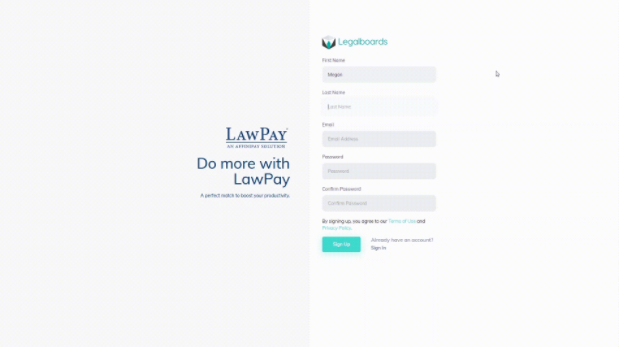
    You can create a new Legalboards account either directly from the Legalboards sign-up page or through the LawPay and Legalboards sign-up page.

    After you submit either form, you will be transferred  to LawPay´s authentication page. Now you’ll need to sign-in with LawPay in order to authorize Legalboards´ access so we can connect with the LawPay system.

    After authorizing Legalboards integration in LawPay, you will be sent back to Legalboards. Now you can use Legalboards to create your workflows and automations while managing your payments through LawPay.

    Adding LawPay to an Existing Account

    If you already have a Legalboards account, adding the LawPay plugin is very simple. You just need to sign in to Legalboards as an admin permission user and then go to Settings > Extensions.

    Find the LawPay icon and click on “See Details” then “Install Now”.

    After confirming your choice, you will be sent to the authentication page in LawPay, sign in there, and authorize Legalboards to be integrated with LawPay. Now you can also use Legalboards as you normally would but have LawPay’s legal billing and payment management capabilities.

    How to Use the Integration

    Now you should have both accounts linked, which allows them to be synchronized. When you open the car’s detail and click on the Payments tab (located on the left side of the screen), you’ll be able to see all bills created for any card that has an email linked, such as contacts or matters.

    You can also create a new bill for any contact or matter that you have on Legalboards, again, with the caveat that the contact/matter has an email attached to it.

    To see the full capabilities of the LawPay integration, open a card that contains an email and then select “New Bill”. Fill in the form as you need, and save. The new bill will be created in your LawPay account directly, and your client will be notified about this open bill.

    Once the client pays the bill, Legalboards and LawPay will both automatically update. Because the two platforms are synced, you don’t need to monitor and manage both platforms.

    If you still need help or have any questions, check out our support portal, contact us here, or check out other resources about the integrations Legalboards offers here.

  • The Future of Hybrid Work

    The Future of Hybrid Work

    One thing to come out of the COVID-19 pandemic is the increased implementation of remote work. Whether that be only partial, to make a hybrid situation, or fully remote, where we work has changed.

    For many law firms, implementing remote work was a considerable feat. In a short period, firms needed to strategize and implement work-from-home policies. Working remotely has both benefits and challenges, but can be done effectively.

    James Cotterman, a law firm consultant with Altman Weil, told the ABA’s Journal that he saw small firms struggling more than larger competitors, particularly firms focused on consumer-oriented law:

    The pivot to remote work was more challenging with less robust tech support and clients less likely to engage or pay timely,” Cotterman says.

    When we talk about remote work, the first thing that comes to our mind is adopting tech tools. We may not know which tool will be best, but we do know what problems these tools need to solve.

    From communication to file management, moving to remote work requires software to improve business operations.

    However, this is only one aspect of remote work. Another important part to creating a positive remote work experience is moving past the traditional way of working in a physical office through a change in our mindset.

    How to Implement Remote Work Effectively

    There are multiple benefits to working from home, but the key is to learn how to take advantage of them. Remote work is common for startups and technology companies.

    For example, Legalboards’ team has worked remotely since its foundation. Our team is located in different countries, continents, and time zones (North America, Europe, and South America). But what can companies do to use remote work to scale?

    • Hold frequent team meetings: checking in with your team about the technology you’re using is important. Getting feedback on how they are adapting to working remotely and their experience with the technology solutions is key;
    • Get organized: remote work requires a high level of organization. Tasks, projects, matters have to be organized in order to be efficient. With in-person work, a team member could go to someone else in the office for help, remote is not that simple;
    • Clearly outline workflows: using clear procedures for everything you have to accomplish so everyone on your team knows what to do. Team members need to be able to know what the process is and what their next steps of a project will be;
    • Use effective communication tools: establish which technology tools will be used for communication. With some solutions, communication can be almost the same as being in person; and
    • Find software that solves a problem: creating synergy between your team’s work, dynamic, and a technology solution. Getting feedback about tools from your team while being open to changes is key. Only with testing software with your team, can you determine if it’s the right choice for you. Take advantage of trials and demo sessions (like ours) to learn more about the tool and test it with your team to make the final decision.

    The increased trend of hybrid work being implemented is also seen within the legal industry. With loosening pandemic restrictions, a hybrid work model blends remote and physical workplaces.

    Hybrid work may look different from firm to firm with some practices opting for specific work-from-home days and policies to allow for flexibility.

    The legal industry has adopted this model as a consequence of the pandemic and following the Court’s virtual changes. Virtual hearings, mediations, etc., allowed lawyers to adopt a hybrid model of work.

    Lawyers can experience the comfort of working at home while seeing the benefits of increased productivity and reduced costs. We can expect to see a hybrid model implemented for the foreseeable future- if done correctly.

    Law firms have been investing in the right technology tools to keep this model effective, and at the same time, provide value to their clients. To learn more about what lawyers can expect to see in the future, check out this article.

  • What Can Lawyers Expect to See in 2022?

    What Can Lawyers Expect to See in 2022?

    The legal industry was forced to quickly adapt to a new digital world during COVID-19. While some practices were adopting new technology prior to the pandemic, many had to make a quick pivot. One thing is for sure, 2020 and 2021 will be marked by the rapid adaption of technology and automation.

    As a result of the pandemic, almost every industry has quickly implemented some type of technology. For the legal industry specifically, some of these changes were long overdue. Legal innovation through increased use of legal technology is key to sustain growth within the industry.

    But, what trends can lawyers expect to see continued into 2022?

    Legal Technology in 2022

    For 2022, there can be no doubt that lawyers will continue to look at adopting new technologies in order to embrace the challenges that come with the world’s “new normal” while remaining competitive.

    Some key trends from 2021 can inform us about the future:

    1. Remote (or hybrid) work is here to stay;
    2. We will continue to rely on technology to assist with daily tasks through automation; and
    3. The challenge of productivity with increased competition within the industries.

    An increase in reliance on technology to make daily tasks easier is shown through the increased implementation of automation to handle tasks.

    Besides helping lawyers with repetitive and/or administrative tasks and helping with volume of work, automation also can be great for new team members.

    Why is Automation Important?

    McKinsey Global Institute estimates 23% of work done by lawyers can be automated by existing technology. Automation can look different for every practice as there is a variety of types of automation. One example is task-chain automation- check out our guide to task-chain automation to learn more.

    A main kind of automation is workflow automation. The goal of any type of automation is to simplify a process. Workflows are predetermined processes within which lawyers can track their matters, tasks, and procedures.

    By tracking these items, lawyers can gain insights into their firm’s productivity and collaboration in order to prevent any snags in workflows. By using software (like Legalboards) to automate workflows, law practices can see significant improvements in their firm.

    Software can improve the efficiency of their operations, reduce the learning curve associated with onboarding, and help visually organize matters. And, perhaps most importantly, automated workflows allow for the opportunity to learn about, analyze, and improve their processes over time.

    How to Get Started

    A great place to start with workflow automation is identifying high-volume, repetitive, and time-consuming tasks.

    For example, using software that can customize and automate workflows for each work type ensures the legal team receives sufficient information to complete the task and reduce errors.

    It’s important to keep in mind that the goal is not to automate 100% of a legal task but rather to achieve improve the efficiency of parts of a task wherever possible.

    Legalboards provides all the tools to create complete workflow automation so you can save time on your daily tasks (and reduce errors!) to spend more time on what’s important.

    Schedule a demo with us today and see how we can help improve your practice in 15 minutes.

  • How to Make Your Matter Management Technology More Than a Digital Filing Cabinet

    How to Make Your Matter Management Technology More Than a Digital Filing Cabinet

    Matter management is a crucial part of running a law firm – particularly for solo and small practices. A critical part of keeping firm overhead low is finding solutions that are effective yet low in cost. Newer software and applications can make a big difference in terms of efficiency.

    However, implementing technology can create an issue involving finding appropriate solutions that don’t work merely as digital filing cabinets. Instead, case management systems must be customizable, provide value, and offer a real solution to a problem or challenge faced.

    Features of The Technology

    Matter management technology helps manage information about a case – type of case, who’s working on it, budget – and track updates throughout the matter’s progression to completion. Some of the benefits of matter management technology include:

    • Upgraded organization. Legal teams can overcome challenges like misplaced or lost files and client information, miscommunication regarding timelines and workflow, and miscalculations about case status, timelines, and milestones with matter management technology.
    • Improved client experience. Case management solutions streamline back-end processes, enabling a firm to function more efficiently both internally and with clients. For example, with a case management solution, all available activity concerning the intake or matter will be retrievable as soon as a potential client contacts the firm.
    • Increased automation. Each case requires the completion of hundreds of small tasks – forms to fill out, documents to send, legal issues to address – all critical yet highly time-consuming. Matter management software takes repetitive everyday tasks off the shoulders of the legal team through automation.
    • Enhanced collaboration. Silos separate data and slow down progress. However, increased communication among team members facilitated by case management technology translates into greater efficiency and more successful outcomes.
    • Enriched analytics. Depending on the solution, matter management technology might reveal which cases are lagging in terms of resolution and help to keep them moving forward. For example, Legalboard’s time automation feature allows users to allow a specific time for each stage of a matter before a reminder is sent out.
    • Elevated communication. Even when team members work remotely, with software, they can provide timely updates regarding all aspects of a case to everyone involved.

    Depending on the specific matter management technology employed, many integrate with other software to provide a well-rounded solution to manage legal matters from start to finish.

    Implementing Technology

    To get the maximum benefit from a matter management solution, law firms need to implement technology that reflects their workflow and helps improve it. Automating processes to help streamline case management is an excellent place to start.

    However, decision-makers must ensure that the software offers solutions that are applicable through the entire lifecycle of the case, including billing, invoicing, and administrative functions.

    Legal matter management software is a tool to manage cases, not just file away information. So, if you’re ready to turn your digital file cabinet into an automated system, contact us to create your first matter board – for free – today.

  • Timesheet Reports

    Timesheet Reports

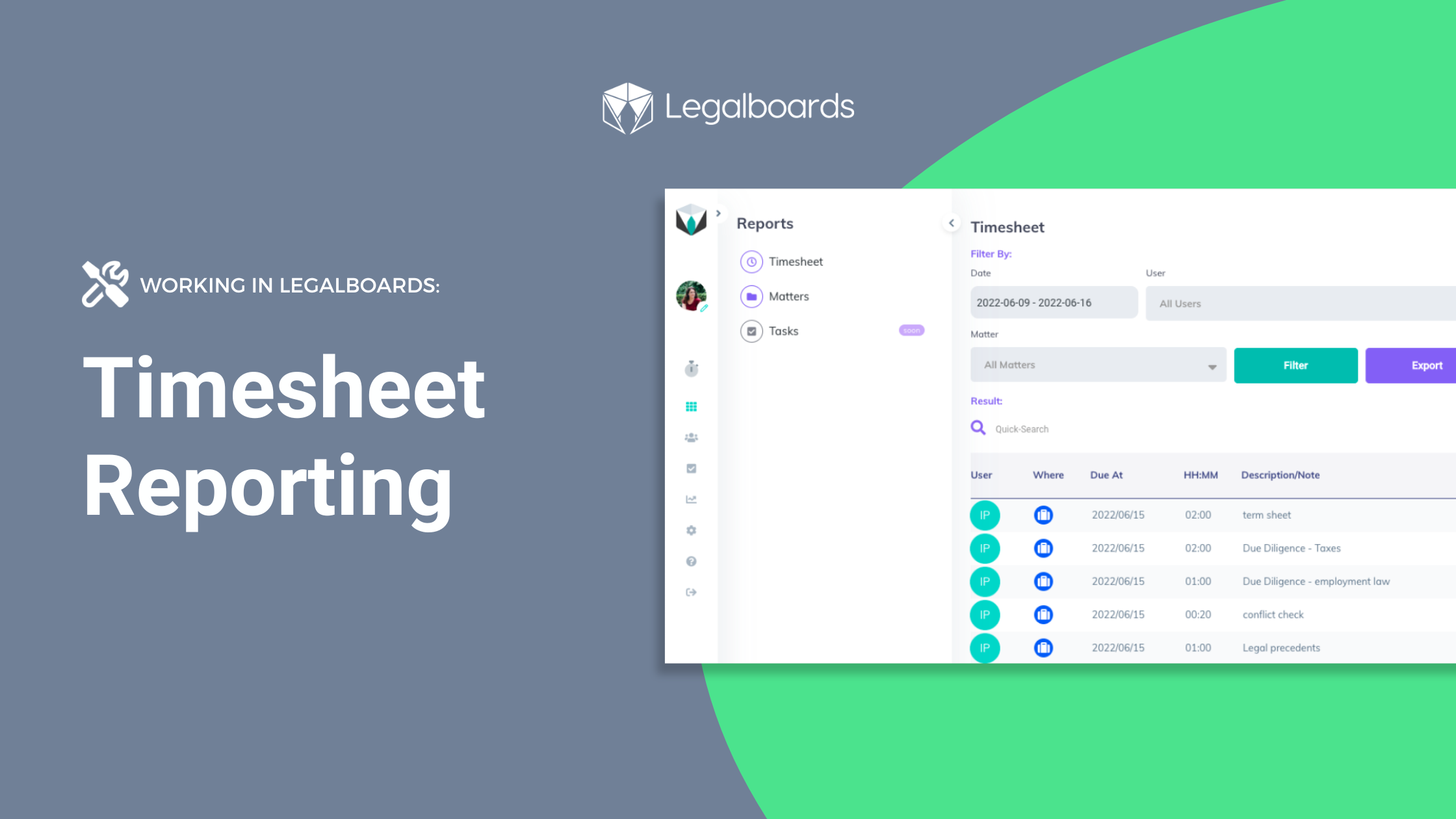
    A great way to track the progress of a workflow is to use reports to summarize information. In Legalboards, you can generate reports in three different ways- by tasks, matters, and now timesheets. Now, these reports can be generated using the time entries in your account.

    If you’re more of a visual learner, check out the video walkthrough of how to generate timesheet reports below.

    How to Generate Timesheet Reports

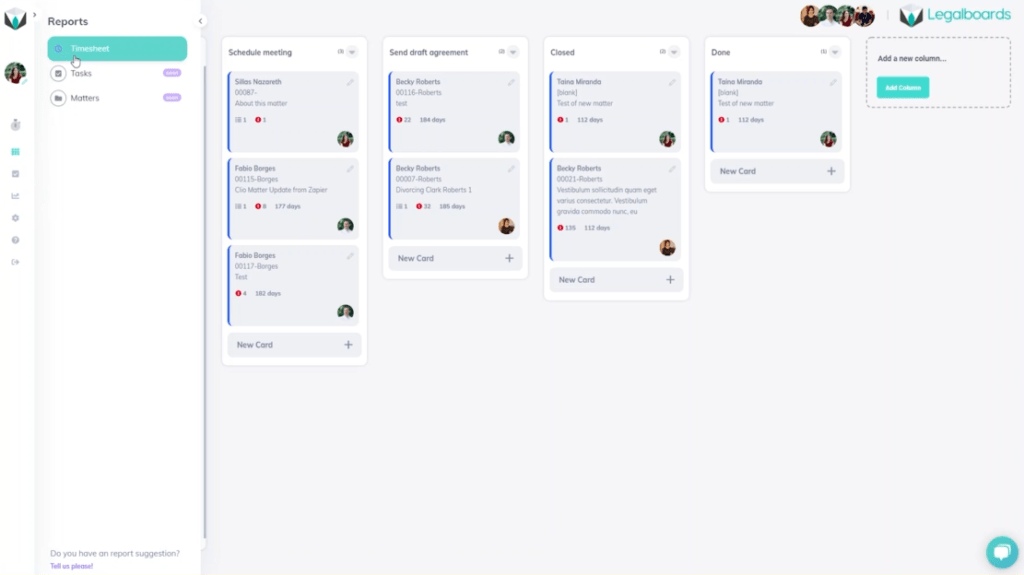
    Within Legalboards, we’re going to find the “Report” button on the left side of the screen. When we click on “Reports”, a sub-menu with three options will appear. Those three options are: timesheet, tasks, and matters. For this guide, we’ll focus on the timesheet option.

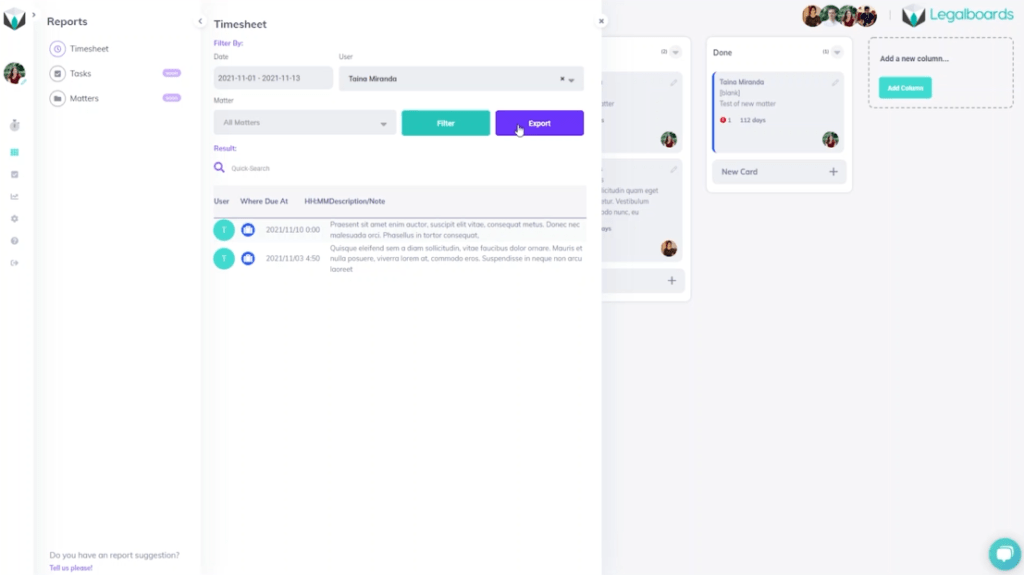
    Once we’ve clicked on the “Timesheet” option from the sub-menu, the report can be generated in different ways. Depending on what we want to capture within the report, there are a couple of options to choose from. We can filter the report by a date range, user(s) associated, or by matter.

    In this example, we’re going to first filter by the date range. With this, we’ll select a timeframe from November 1 to 13th, 2021 to first generate our report. And from there, we can further filter by selecting the user we want to focus on.

    If we wanted, we could also filter down one more level into specific matters. But, in this example, we’ll just stick to filtering by time and user in order to export our generated report.

    Next Steps

    Didn’t find what you needed? Check out our YouTube channel for more video guides, support portal, or contact our team for more help with Legalboards.

  • Estate Planning Template

    Estate Planning Template

    It can be difficult to organize your workflows as different cases require different processes. We want to help you organize your workflow, and having a template to work from can be helpful to get started. Our team has developed an Estate Planning template for you to get started with.

    How to Get Started

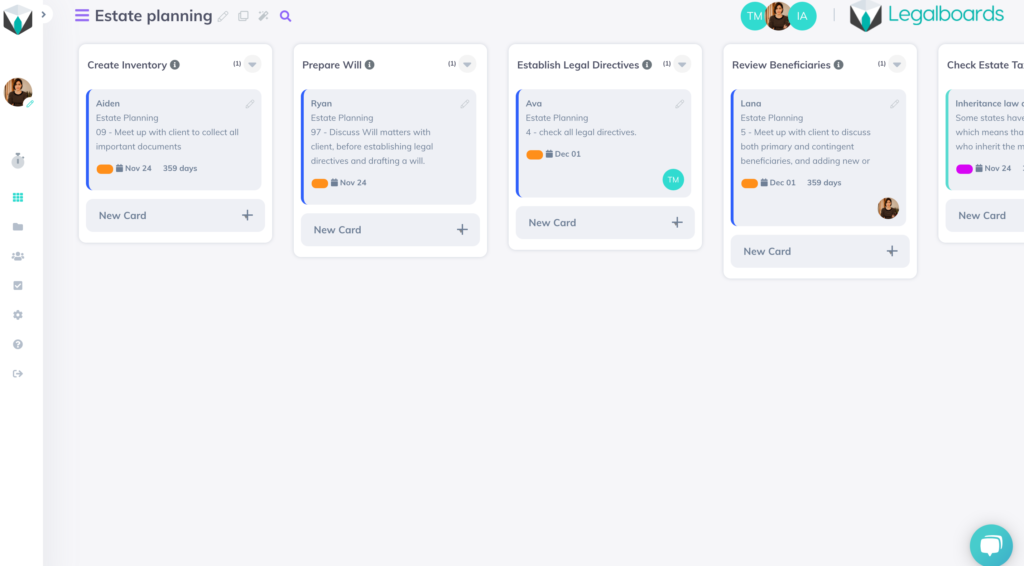
    In Legalboards, you’re able to either create your own boards or use one of the prepared templates. Our Estate Planning template is an example workflow for estate practices. Check out the video below to see how the template looks in action.

    We’ve included six common stages of the estate planning process as columns (or phases) on our board. These stages are “Create Inventory”, “Prepare Will”, “Establish Legal Directives”, “Review Beneficiaries”, “Check Estate Tax Laws” and “Final Arrangements”.

    If one or more of these titles are not applicable to your practice, you can edit the title to better reflect your process or delete the column altogether. As well, you can divide the board into separate smaller boards to track a more detailed workflow.

    Creating Boards to Reflect Specific Workflows

    Using a project management perspective, it’s helpful to think about three questions when creating a board to reflect your workflow:

    • What goals do you have for the matter that need to be reflected?
    • What pivotal moments/phases need to be tracked until they are completed?
    • How can the process be standardized so anyone viewing the board can easily understand what their role in completing the workflow is?

    If you’re unsure of how to start defining your workflow, check out our resource on how to get started applying agile methodologies to your practice that will aid you in creating a board that best reflects your specific process.

    How to Create an Effective Workflow Using The Template

    In order to make this Estate Planning template more tailored to your practice’s specific workflows, follow these steps:

    1. Edit General Information

    By clicking on the icon “Edit This Board”, you are able to change the name of your board, add a description for your team to understand the board, and share it by inviting other team members to work on the board with you.

    2. Set Up Automations

    Legalboards has almost 10 different automations to help you implement in order to streamline your workflows. All automations follow essentially the same process- check out this guide on how to get started setting them up.

    We recommend setting up at least 3 automations;

    • New Card so all new matters that meet certain criteria would automatically be attached to this board;
    • Task Creation so you don’t need to worry about managing roles and their timelines; and
    • Move Card so that matters can automatically be moved to the next phase of your workflow.

    Next Steps

    If you want to start using more automations in your workflows, check out our video guides on our YouTube channel.

    Didn’t find what you needed? Check out our support portalcontact our team, or check out our other resources for help using Legalboards.