Author: legalboardsdev

  • Workflow on a Multidisciplinary Legal Practice

    Workflow on a Multidisciplinary Legal Practice

    When you’re choosing your legal case management system, you likely have questions about how to reflect more complex workflows. This is especially true if your law office or department deals with different practice areas.

    While separate boards for each legal team, practicing area, and general management boards are preferred, they’re not always practical. When you try to have a unified workflow in a multi-practice office, you risk making your board too complicated or too generic, and it becomes difficult to sense process improvements both ways.

    It’s becoming increasingly common for legal practices to work across multiple practicing groups. Your software needs to reflect this modern way of working and allow for communication between multiple departments.

    If you’re using Legalboards as your agile legal management platform, your boards can interact with each other. This allows different teams to collaborate on specific tasks across departments and offices. 

    In this article, we’ll discuss some example use cases for how a legal case management system can help multidisciplinary firms with their billing and contracts.

    legal case management workflow pictured

    It goes without saying that legal billing is an integral part of your workload. However, without the correct processes in place, it can be time-consuming. Even worse, the time spent billing is not itself classed as billable hours. Because of this, it’s important to create a smooth process for billing, invoicing, and collecting payments. 

    First, in order to bill for your time fairly, you need to have an accurate idea of how much time you’ve spent on an individual client. This can be done by memory but is made much easier with legal case management software. With time tracking tools, you can ensure you’re accurately keeping track of all the time spent on a client’s case.

    You can automatically track the billable hours on your phone or desktop, so you don’t have to rely on your memory. You can be confident that the time spent on client work is correctly allocated. 

    Next, the software ensures that the billable hours are automatically assigned to the correct client in your system and can be allocated to their invoice. With this automatic allocation, it only takes a couple of clicks to create, check, and create an invoice for a client. 

    Once your invoice is ready to be sent, you can move the task to a column called “billing” on the workflow board and set an automation that creates a new card on a second board to let the administrative staff know this case needs to have the invoice sent. 

    At this point in the workflow, the invoice is sent to the client by your administrative team, leaving you to return to billable work. The invoice can be sent with multiple options for payment, making it simple for the client to pay promptly. And if a client doesn’t pay within the allocated payment terms, you can create an automation to send billing reminders. 

    Once the payment is received, the billing process can be marked as completed. This can trigger another automation returning the card to the ‘completed’ column on the legal workflow, sending an alert to the legal team to begin work on the case.

    Depending on your area of law, there is likely to be a handful of standard contracts you send out time and time again. Some contracts, like NDAs, are relatively standard and can be sent out to different clients with minimal revision. 

    Without a workflow in place, what should be a quick process can become overly complex, time-consuming, and unnecessarily costly for the client. 

    Without a process for storing, editing, and sending template contracts to clients, you’re going to waste time hunting down the latest template. As well, the latest version you need could be in a different team, office, or department. 

    Or even worse, unless you are confident that the version of the contract you’ve found is updated and without errors, you might waste time reviewing and fixing things in the document before it’s ready to be sent out. 

    Contract Workflow Example

    Contracts are a prime example of how you can use automated workflows across multiple departments to streamline your process and reduce wasted time. Here’s how:

    The first step in creating an automated workflow for contracts is to prepare a master template. This needs to be created by the relevant legal team and saved as the most up-to-date and final version. 

    Next, using the legal automation software, provide access to the master document to all relevant departments and team members. This allows team members to create new versions for their clients, and make changes to the duplicate while leaving the master version intact and available for other team members to use. 

    Once the document is prepared, the team can set an automation that moves the task to the “Contract Prepared” column. This can then alert the administration team that the contract is ready to send to the client. 

    The client is sent the document electronically and the task is moved to the “Waiting on Client” column in the admin teams board. Once the client signs and returns it to the administrative team, the contract is stored securely in a folder connected to the client and easily accessible for future reference. 

    Finally, the administrative team can move the task to a new column to alert the legal team that the document is signed and the subsequent legal work/tasks can begin. 

    These two common scenarios highlight how legal case management workflows can streamline the tasks which overlap teams and departments. They enable team collaboration and reduce the time spent on repetitive administrative tasks. 

    What’s more, by designing approval workflows into the process, automation software can ensure that any documents sent have been approved by the relevant team member. 

    Our tool can help you automate your entire workflow across multiple practicing groups and even external stakeholders. Check out our YouTube channel for more content on how you can use Legalboards to automate your workflow.

  • Applying Agile Methodologies to Your Practice

    Applying Agile Methodologies to Your Practice

    A dilemma that most lawyers face is “billable hours”. The time spent on client work must be spent wisely. If customers can’t see the correlation between time spent and results, it’s highly unlikely they will stick around or leave a positive review. 

    How to Improve Law Firm Cash Flow provides great information about making the most of your day. By automating repetitive tasks, using case management software to organize your information, and so on, productivity improves.

    Still, it’s not easy to manage your priorities in such a way that you don’t end your day with the feeling that you’ve worked a lot but achieved very little. 

    Time management issues are not only specific to legal professionals. Lawyers can learn from other industries such as tech, software, and project management, that are already successfully implementing an Agile approach. 

    When implemented correctly, Agile methodologies can help lawyers improve their efficiency, retain happier clients, motivate team members, and foster a culture of responsibility and accountability in the workforce.

    What is Agile Methodology?

    To understand what Agile methodologies are and how they can be applied by lawyers, let’s first cover what Agile is.

    Typically used in the tech world, Agile is an approach to project management that enables teams to deliver value to their customers quickly. The aim is to deliver work incrementally instead of waiting for the end product to be finalized and perfected. 

    The methodology is designed to provide a mechanism that allows teams to respond to changes in requirements, plans, and results quickly and easily. It’s great for tech companies, and it’s increasingly being applied to other industries, notably law. 

    Agile Methodologies For Lawyers

    An increasing number of lawyers are incorporating Agile methodology to enable them to manage projects and support many transactional practices such as immigration, real estate, divorce cases, and business formation. 

    While many traditional project management methods require a mountain of upfront work to plan and set up, the beauty of Agile is its ability to break a project into smaller tasks and provide fast value to the client. 

    Agile methodologies have four main values to offer to the legal industry

    1. Individuals and interactions over processes and tools 
    2. Focus on the client’s needs over the service you provide
    3. Clients collaboration over service’s scope negotiation
    4. Responding to change over following a plan

    3 Agile Techniques Lawyers Can Use

    Technique #1: Add a Physical Form to Your Hidden Processes

    One of the major issues with the modern method of working is the lack of visibility. Much of the time, especially in the legal field, work is hidden. Workflows and processes can be hard to see and the work-in-progress is often simply hidden on a screen or, worse still, inside an employee’s head. 

    The first step of the Agile methodology is to give a physical form to these “hidden” processes—this is where Kanban (a Japanese term for “sign” or “card) boards come in. A card on a Kanban board (as pictured below) is used to provide a physical form for a piece of knowledge work. 

    kanban board example

    The cards are arranged with columns that represent stages of the workflow. In legal, the stages can span from marketing and quotation to client intake, case inception and so on. 

    The Agile methodology enables you to see the tasks as they progress through the relevant stages of completion. 

    Technique #2: Use User Stories Instead of Tasks

    Task-based project management is not for everyone. For some, it can feel liberating, while for others it may feel like a mountain of never-ending micro-tasks. In Agile, another popular technique that lawyers can implement is ‘User Stories’. 

    Instead of defining every single task that is required, lawyers can create a statement including the problem that needs to be solved and why. This creates a User Story for a specific customer, their needs, and, importantly, the reasons for the need. 

    A simple format for a User Story would be:

    As a ________________________, I need to be able to _________________, so that I can _________________________.

    In a law firm, an example of this Agile technique could be:

    As an elderly person with declining health, I need to be able to ensure my assets are equally distributed to my dependents upon my death. 

    Armed with your User Stories, you can replace a series of tasks and attach a measurement (e.g. “Done”). You can then address if the problem in the User Story been solved.

    Technique #3: Learn and Improve

    One of the keys to Agile methodology is rituality. Rituals are quick and effective ways for your team to communicate, help each other, ensure accountability, and measure progress. 

    The main types of rituals include: the Planning Meeting, the Daily Stand Up, the Review Meeting, and the Retrospective. With the first three types focused primarily on planning, the Retrospective is all about process and continual improvement. 

    You should ask the following questions:

    •  What went well that we should keep doing?
    •  What didn’t go well that we should stop doing?
    •  What should we try that is different?

    Benefits of Agile Methodologies for Lawyers

    You can apply Agile to your legal work by making small changes in the way you approach cases. By breaking cases up into several stages and incorporating constant collaboration, it allows for continuous improvement and iteration at every stage. 

    The main benefits of Agile for law practices are:

    1. Flexibility: Kanban boards allow for the most important work is always placed at the top of the pile. Once a team member has completed a task, they don’t need to worry about what to do next. They can simply select the next item (relevant to them) from the backlog and get started. 
    2. Saves time: A Kanban board offers a bird’s eye view of all of the tasks within a project and allows all of the team members to see the collective and individual progress. With this overarching view, team members can spot inefficiencies and opportunities for improvement.
    3. Efficiency: With a clear view of what needs to be done, team members have a detailed vision of what needs to happen, when, and by whom. Workflow has a clear definition and team members have a clearly defined role.
    4. Save money: An efficient team will save time and money. It will also deliver value and good quality work for your clients. A win, win if you drop your billable hours, improve customer satisfaction, and increase positive client reviews.

    Applying Agile methodologies is a bold but necessary shift. With Agile, the approach to planning in shorter and iterative cycles means priorities can be shifted from iteration to iteration. This allows you to fully address the client’s needs.

    What we’ve learned working with lawyers so far is that Agile methodologies help to improve productivity and efficiency, read more here.

    Do you want to learn more? Check out this 2016 article from Harvard Business Review about how Agile methodologies are spreading across a broad range of industries and functions, and just keep on propagating.

  • Task-chain Automation: What It Is and How To Use It In Your Legal Practice

    Task-chain Automation: What It Is and How To Use It In Your Legal Practice

    Studies show that administration and manual tasks take up nearly half of the time spent in a legal practice. That’s a huge amount of your time and also a massive cost to your clients.

    Fortunately, there are tools designed specifically for lawyers that can reduce the time spent on repetitive tasks. In turn, this will reduce your non-billable hours, increase your customer satisfaction, and deliver real value to your clients.

    This article covers the definition of task-chain automation, its benefits, and how to implement it in your legal practice.

    What Is Task-Chain Automation?

    Legal work consists of tackling tasks in a specific sequence, with or without dependency points, and finishing everything efficiently.

    If you’re following an agile methodology for your legal work, you already know you can identify this task chain as part of your workflow.

    Task-chain automation enables you to schedule the execution of a series of pre-set tasks. Automations are helpful if you conduct repetitive tasks regularly—they save you time and reduce your non-billable hours.

    The Key Benefits of Task-Chain Automation 

    • You can use task-chain automation during the entire cycle of each workflow (and even between workflows).
    • Task-chain automation keeps team members aware of what will happen next and reduces interruptions to lawyers’ work.
    • Using Legalboards automation capabilities, you can assemble sequences of tasks without any complex integrations or coding.
    • Having a predetermined process decreases the learning curve of new team members.

    Creating a Task-Chain Automation

    Defining Tasks

    To create task-chain automation, you need to define a sequence of tasks. The tasks can either run on a predefined recurring basis or on demand. The key is to define what tasks will run and the settings and conditions required for the task to initiate.

    It may sound complicated but it’s as simple as:

    • Defining the tasks you would like to automate
    • Adding the tasks to the automation
    • Configure the settings you want the automation to use
    • Arrange the tasks in the order they need to run
    • Define a schedule that the tasks must follow

    Because tasks are more specific to certain areas of law practice, you may want to prepare a list of tasks. Typically, these lists for each type of work depend on the area of the law and the status of your cases.

    Assuming, for this exercise, we’re dealing with an area-focused board, one common approach is to define a set of tasks that must be performed at each stage.

    Creating an Automation Workflow

    Now that you have a list of tasks per phase, you can start the automation process by simply identifying what order to perform the tasks in and how long they will take.

    Here is an example of automation for client intake:

    1. A new lead is generated on the website.
    2. The new lead triggers a prospective client record to be created in the CRM.
    3. An email is generated to the lead confirming the practice has received the inquiry
    4. The receptionist follows up and books the lead in for an initial meeting with the lawyer.
    5. The receptionist updates the record in the system to status “1st consult booked”.

    If you’re using a legal agile tool, you can define what triggers need to be pulled to start the next tasks. Sometimes, you will need to pull the trigger as soon as another task is completed. Other times, you will pull it after a set interval because a phase of completion is waiting for someone’s approval.

    In both cases, you can easily prepare the automation to auto-assign new tasks to yourself or other team members using a cascade model.

    You can also force the next task to automatically begin after all the conditions are met.

    Examples of Task-Chain Automation

    When working as part of a team I’m sure you find there are a series of tasks that happen in sequence every time you start a new case.

    Without practice management software, this process likely looks something like this:

    > Manually assign team members > Send out an email to team members to assign tasks > Wait for a reply from team members > Wait for an update from team members

    This may work if your team is on its A-game, but to eliminate inherent human error, law offices can use practice management software like Legalboards with task-chain automation.

    You can create predefined lists of tasks that are assigned to team members with automatic reminders and updates.

    Automated Workflow

    Practice management software allows you to create a flow for all of your processes. It enables you to keep cases up-to-date and reduce the administrative burden on team members.

    A new intake may look like this:

    1. Run a conflict check.
    2. Send a new client letter to the client.
    3. Receive the signed new client letter from the client.
    4. Receive payment from the client.
    5. New file opened in your project management software.
    6. Initial meeting scheduled with the client.

    This can all be done manually—however, many of the steps are repeatable and regular, which makes them prime candidates for task-chain automation software.

    With Legalboards, armed with your list of tasks, you can create a sequence that automates 90% of the workload in the flow above. Your team may be required to trigger the software to move between stages, but many of the tasks can be done automatically.

    For example, once the conflict check is approved, this can trigger the system to send a new client letter and add a “waiting for client” status to the record. Once the letter is returned, this can trigger the system to send a request for the retainer payment and so on.

    Not only does this allow the manager to have an overview of the status of all tasks, but it also prevents any items from slipping through the net. Everyone can see exactly what is expected of them—and by when.

    Get Started with Task-Chain Automation

    The key to success with any new project management system is team buy-in. You need to ensure all team members understand the change and what is expected of them.

    It’s also important to start with a manageable portion of the workload—for example, just the intake process. While it may be tempting to dive in at the deep end, it’s far better to start small and then gradually increase the scope of the tool.

    Once you’ve used the new automation for several weeks, you’ll understand what worked and what didn’t and, most importantly, how you can ensure the success of your next automation.

    Share with us how would you prepare a task-chain for your area of expertise by getting in touch with us. We’re building a gallery of the best agile workflow for different areas of the law. We’d love to see yours and learn how it boosts your team’s productivity.

  • Getting Started With Agile For Lawyers

    Getting Started With Agile For Lawyers

    Implementing agile for lawyers is easier and more efficient than it seems. As a busy lawyer or legal office manager, you’ve likely noticed how you and your team have repetitive tasks.

    Not only is this way of working highly inefficient, but it also costs your clients money, reduces customer satisfaction, and wastes time. To combat the inefficiencies in traditional project management, legal practices are increasingly adopting an agile approach to delivering client work. But what is agile and what are it’s benefits? Let’s start with what it is.

    What is Agile?

    Agile is an approach to project management that emphasizes delivering continuous and incremental value. This is done through not waiting for a huge finished project to complete.

    This works through agile methodologies, which are a set of behaviors you and your team can apply in daily work to be more productive. Agile helps your processes stay consistent and get things done faster, better, and with continuous improvement.

    It focuses primarily on the fact that plans, tasks, and results can change regularly. It’s an iterative approach that allows quick response times without sacrificing the value delivered to the client.

    Like other service industries, legal offices are adopting the agile approach which emphasizes team collaboration, continual planning, incremental delivery, and ongoing learning and iteration.

    Defining Your Agile Process

    The first step in getting started with Agile for lawyers is to define your process. In agile, a Kanban board is used to define the workflow, provide an overarching view of tasks in progress, and highlight overall headway toward the end goal.

    What is a Kanban Board?

    Kanban boards offer a visual overview of work and its various stages.

    By creating a physical form for a “hidden” task (tasks often held in a team member’s head or on a screen), the Kanban board allows a visual representation of an invisible piece of work.

    This physical form enables team members to easily see the status of tasks, collaborate with other team members, and for managers to have an overarching view of the project progress as a whole.

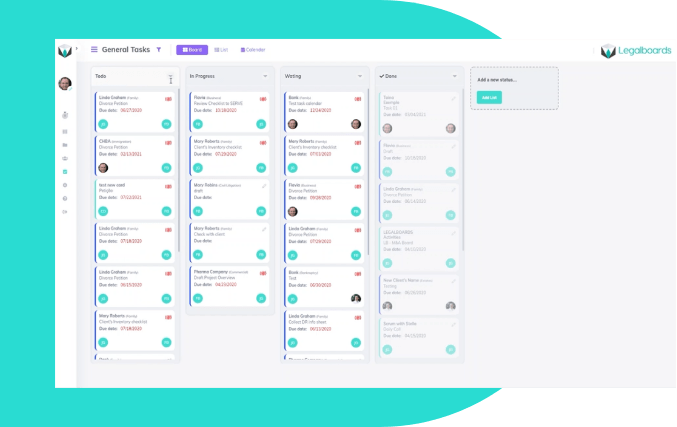
    Traditionally, a Kanban board was a series of columns jotted on a whiteboard or piece of paper with sticky notes as the tasks.  However, today’s agile lawyers rely on online tools like Legalboards (shown below). These digital tools give you quick access to your case details, due dates, tasks, invoices, and much, much more.

    Legalboards screenshot

    Legal Kanban boards usually have columns representing the phases your jobs pass through during the entire cycle, from client intakes to final delivery and billing. In other words, the columns represent all of the tasks you are doing, divided by status.

    In its most simple form, a Kanban board has 3 columns: To Do, Doing, Done. You can easily start with 3 columns by following this process:

    1. List out all of your current tasks
    2. Move all of the current tasks to the To Do column
    3. Assign tasks to a team member and move them to the Doing column
    4. Meeting once per day to review progress with your team members, update and/or complete tasks

    While some may love the simplicity of three columns, it’s highly unlikely in real life that the tasks in a legal office can be so neatly split.

    Identifying Delays

    Within your workflow, there will be several times when a piece of work is waiting for other people to perform an action to move it forward.

    This wait could be because the work could be pending approvals or waiting for drafts, revisions, or so on. Also, you might notice tasks that need to be performed in a specific order, while others can be executed simultaneously.

    These stages require a Work in Progress, a Waiting on Client column, or potentially even a Blocked column.

    You’ll know where these bottlenecks are. The key is to design your Kanban board to account for the blockages, so you can easily see the status of tasks, what requires your input to speed things along, and what’s proceeding as planned.

    Start defining your process by simply trying to find the most obvious roadblocks that interrupt your cases’ progress. What you find lets you know what you should focus on when completing your Kanban board columns.

    Benefits of Using Agile

    Flexible and Customizable

    Your Kanban board can be as simple or as complicated as your services require. You can add to the board(s) as you increase your client offerings and you can update columns as you learn what works and what doesn’t.

    You can also use your Kanban to define a limit of how much work can be sitting in Work in Progress at any one time. This allows you to set a work limit, keep tasks flowing smoothly, and ensure work is delivered on time.

    Grows With Your Firm

    Your Kanban board is designed to grow and evolve with you. Additional columns can be added to show new client work, the onboarding process, billing, and completion.

    You can even add horizontal swim lanes to visually group tasks related to one client using color coding.

    The structure of your board will change depending on your goals, services, clients, and more. It can easily be adapted to meet the current needs of your firm and even individual clients.

    Every legal office and every client is different, so you can tailor more Advanced Kanban boards specifically to your situation.

    Kanban as the Catalyst for Change

    Legal offices moving to the agile methodology and Kanban boards can find the transition a challenge.

    The change requires a shift in mindset from driving towards the completion of a project as a whole to small, incremental steps and continuous delivery of tasks. The method requires collaboration, communication, and constant learning from retrospection.

    Kanban can enable this change by providing a visual reminder of the status of individual tasks and a view of the overall project.

    What’s more, the public nature of the workflow can motivate team members to be responsible for their own output, increase communication within the team, reduce the amount of downtime between tasks, and foster a culture of accountability.

    Ready to Learn More About Agile for Lawyers?

    Today’s legal world is fast-paced and competitive. Everything must be done faster and better and clients expect tangible results. Kanban boards and the agile methodology can help your firm meet those client needs.

    Want to read more about Agile in law and for lawyers? Read our introductory article to Legalboards.

  • Visual Matter Management

    Visual Matter Management

    Law practices are now increasingly reliant on technology to manage matters and legal operations. However, without proper processes and workflows technology becomes counterproductive to efficiently managing a matter to close–costing you time and depreciating your firm’s technology investments.

    As co-founders of Gimbal and attorneys with decades of experience, Karen Dunn Skinner and David Skinner have helped thousands of lawyers increase the productivity of their practices by implementing successful legal project management principles.

    Join Karen and David in this Legalboards webinar as they share insights on:

    • Framework on better management and tracking of matter progression throughout litigation
    • Visualizing tasks and activities and the benefits of utilizing a Kanban board
    • Understanding the benefits of agile and technology for law practices

    Meet The Speakers: Karen and David from Gimbal Canada

    Karen Dunn Skinner is the co-founder and CEO of Gimbal Canada. She’s a Lean Six Sigma Black Belt and an attorney with over 20 years of experience practicing law in Canada and Europe.

    David Skinner is the co-founder and President of Gimbal Canada. He’s a certified Lean Six Sigma Sensei with over 20 years experience practicing law. David spent more than 10 years in large, international law firms in Canada, Europe, and the UK.

    Follow Gimbal on social media to get updates and tips on LinkedInTwitter, and Instagram.

    Watch The On-Demand Webinar

    Want to Learn More?

    Check out more about Kanban, matter management, and more in our resources.

    Ready to get started? Sign up for a free trial with Legalboards and see how a visual matter management system can improve how you work.